Run review
Totals, average salary, payslip count and a per-employee table before approval.
See how every rupee in the run was worked out, and make sure someone else has looked before money moves.
Updated 2026-11-08
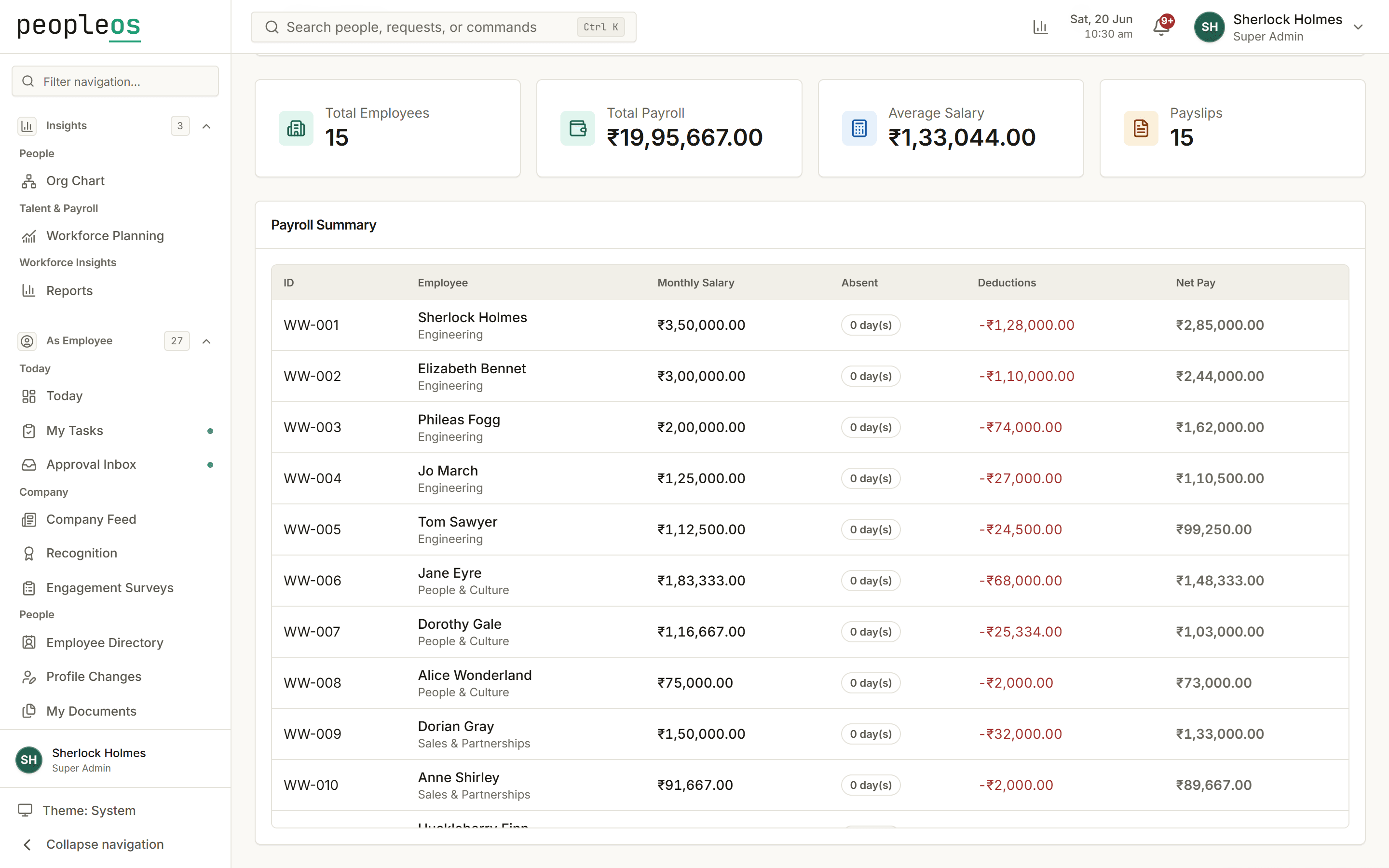
Each run starts from approved attendance and the salary structure, applies your statutory policy, and lays out every line for review. Approval is a separate step for a separate person, recorded in the audit trail.
Totals, average salary, payslip count and a per-employee table before approval.
PF, ESI, Professional Tax and New Regime TDS from rates you configure.
Prepare and approve are separate permissions you assign by role.
Bank advice, PF ECR and ESI return files from the approved run.
Preparing and approving a run are separate steps, and every change is recorded in the audit trail, so a second person can check the run before anyone is paid.
PF (with wage ceiling), ESI (with eligibility threshold), state Professional Tax slabs and New Tax Regime TDS. Each is configured in your payroll policy and shown line by line when you review the run.
PeopleOS produces bank advice, PF ECR and ESI return files from approved payroll runs. Acceptance of those files by banks and government portals is still being verified, so check each file before you upload it.